support@zurihr.com
+254 757 012345
The General Settings section in Zuri HR lets you fine-tune payroll operations by defining overtime rates, bank account configurations for salary disbursement, and currency settings for local or multi-national payroll.
Open your Zuri HR portal in your browser.
Enter your admin credentials and click Log In.
Go to the Settings section in the left sidebar.
Select the Payroll submenu.
At the top of the page, you will see tabs:
Payroll Settings
Formulas
Pay Slip Design
General Setting
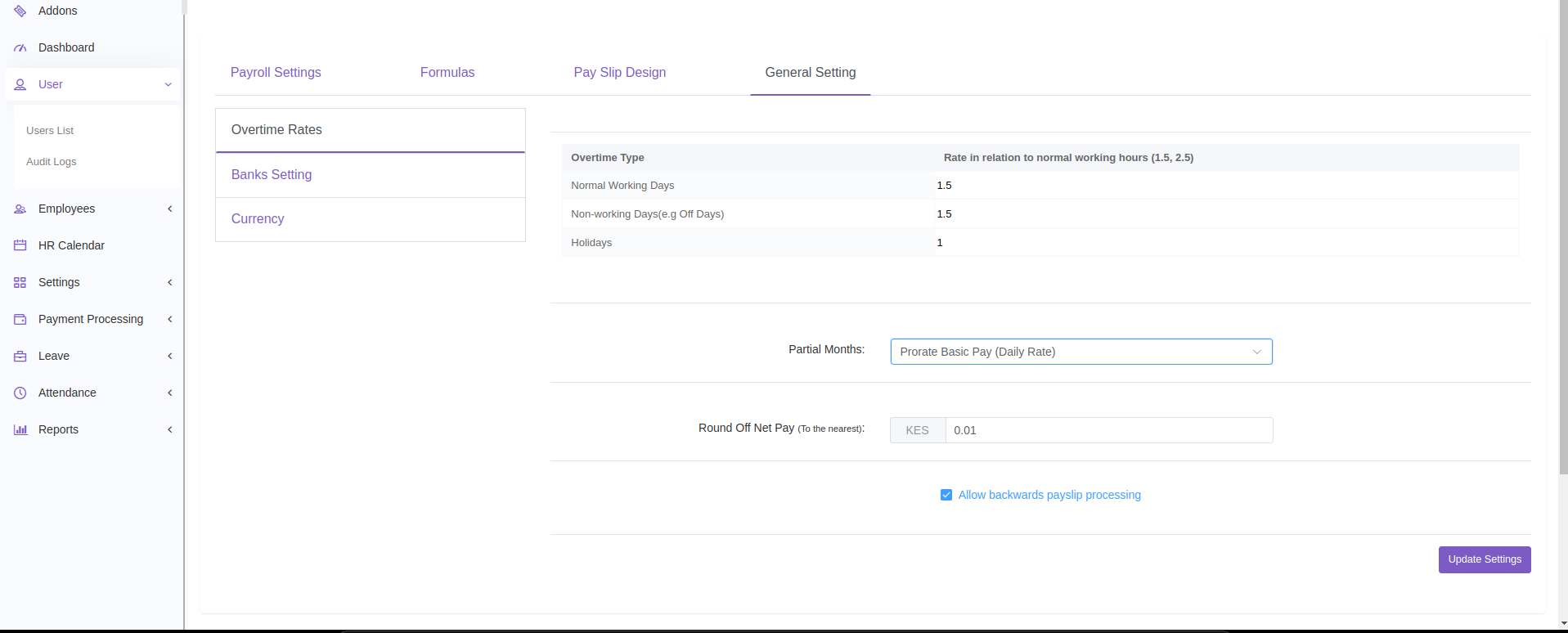
Click on the General Setting tab to open payroll-wide configuration options.
On the left panel, you’ll see three configuration sections:
Overtime Rates
Bank Settings
Currency
Set the rules that define how overtime is calculated and how partial months are paid:
Normal Working Days – e.g., 1.5x of hourly rate
Non-Working Days (e.g., Off Days) – e.g., 1.5x
Holidays – e.g., 2x pay
Prorate Basic Pay (Calendar) – based on actual calendar days
Prorate Basic Pay (Daily Rate) – based on working days only
Full Month Payment – pays full salary regardless of start/end date
Tip: Choose the method that aligns with your company’s employment contract terms.
Configure the banking details used for employee salary disbursement.
Add your company’s:
Sort Code
Account Number
These details will be used when generating net pay submissions for upload to bank portals.
Tip: Double-check with your finance before saving.
Handle multi-currency payrolls or set your organization’s base currency:
Base Currency – Select your organization’s default currency (e.g., KES, USD).
Other Currencies – Add foreign currencies manually:
First, search from the system the current exchange rate
Then, input the preferred rate you’d like Zuri HR to use in calculations
Tip: Update rates regularly if you're paying international employees or suppliers.
Use realistic overtime rates to avoid payroll discrepancies.
Align your proration method with how leave and onboarding/offboarding are handled.
Make sure your bank details match the bank file format used by your payroll bank.
Regularly update exchange rates for international accuracy.
Need Support?
Contact your Zuri HR admin or email support@zurihr.com for setup assistance.