support@zurihr.com
+254 757 012345
Zuri HR makes it easy to personalize how your employee payslips look and what they contain. From layout and logos to data security and formatting, you can tailor everything to reflect your company’s standards.
Open your browser and go to your Zuri HR system.
Log in using your admin credentials.
From the left sidebar, click Settings.
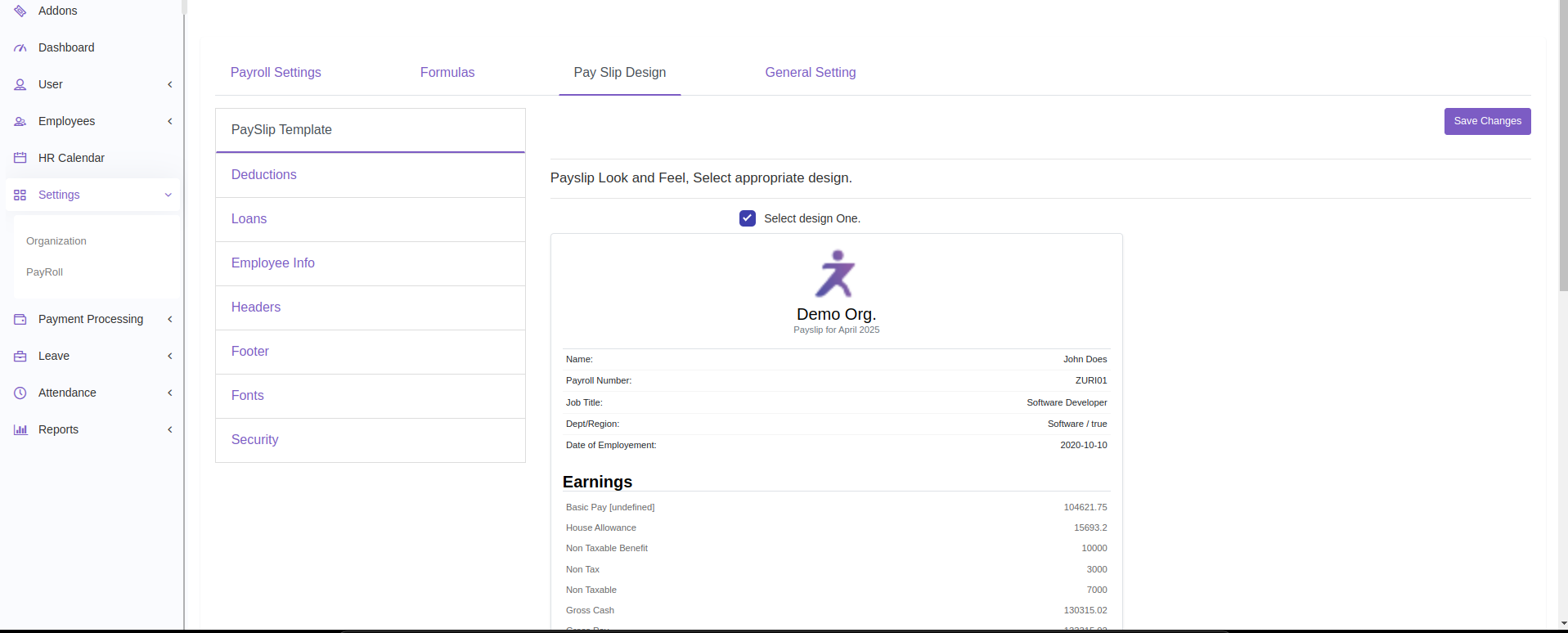
Under the Payroll section, you’ll see four tabs at the top:
Payroll Settings
Formulas
Pay Slip Design
General Setting
Click on Pay Slip Design to get started.
You’ll see a vertical list of configuration sections:
PaySlip Template
Deductions
Loans
Employee Info
Headers
Footer
Fonts
Security
Each section allows you to control a different part of the payslip layout and content:
Choose from the available payslip templates.
The first template is selected by default.
Simply click on your preferred layout to switch.
Choose how deductions are displayed:
Total to Date (TTD)
Year to Date (YTD)
Select which specific deductions you want to appear on the payslip.
Choose the format for displaying loan balances:
TTD or YTD
Select the specific loan types you want visible.
Check the boxes next to employee details you want shown on the payslip, such as:
Name
Job Title
Date of Employment
Department, etc.
Set alignment for your company logo and header text:
Left, Center, or Right
This controls how the top part of the payslip appears.
Add a custom note or disclaimer that will appear at the bottom of every payslip.
Example: “This is a system-generated document. No signature is required.”
Customize the look and feel of the payslip:
Choose Font Family
Set Title/Header Font Size
Adjust Body Font Size
Select Background Color and Text Color to match your brand.
Choose if you want the payslip to be password protected.
You can set the password to be based on:
National ID
Bank Account Number
KRA PIN Number
Or leave it unprotected for easier access
Once you’ve customized all the desired sections:
Click the “Save Changes” button at the top-right corner.
A confirmation will appear:
Payslip settings have been applied successfully.
Enable security features if you are emailing or sharing payslips online.
Preview the template with sample data before finalizing changes.
Need Help?
For advanced formatting or troubleshooting, reach out to your system admin or email support@zurihr.com.